app-preview
A command-line tool that turns raw app screenshots and screen recordings into App Store and Google Play assets that pass store validation the first time. It works the same for developers at a terminal and for AI agents.
pipx install app-preview
app-preview generate raw/*.png -t apple.iphone-6.9 -t google.phone --template dark --caption "Plan your week"
46 store targets
Every App Store and Google Play screenshot, preview video, graphic and icon spec, from the official pages.
Validate
Size, format, transparency, color mode, file size, counts, video codec and length, each with a stable code and a fix.
Marketing screenshots
Captions, gradients and device frames that scale to every device and orientation.
Whole listings
One app-preview.yaml renders every screen × device × language.
App previews
Convert recordings or build slideshows that meet Apple's encoding rules.
Agent-ready
--json everywhere, stable exit codes, and a built-in MCP server.
Install
pipx install app-preview                 # or: uv tool install app-preview
uvx app-preview --help                   # run once without installing
pipx install "app-preview[mcp]" # include the MCP server for AI agents- Python 3.10 or newer. Dependencies (Pillow, click, PyYAML, pydantic) install automatically.
- Homebrew:
brew install pipx && pipx install app-preview. - From source:
pipx install git+https://github.com/Dev101911/AppPreviewGenerator. - Optional tools:
ffmpegfor videos; Xcode (iOS) oradb(Android) for capture.
Check it works with app-preview --version and app-preview targets.
Quickstart
1. Pick your targets
A target is a store plus a device class. For a typical iOS and Android app, start with:
app-preview targets --store apple       # apple.iphone-6.9, apple.ipad-13, ...
app-preview targets google.phone        # full rules for one target
2. Check what you have
app-preview identify shots/home.png     # which targets does it already fit?
app-preview validate shots/*.png -t apple.iphone-6.9
3. Make compliant copies
app-preview generate shots/*.png -t apple.iphone-6.9 -t apple.ipad-13 -t google.phone -o store-assetsFiles land in store-assets/<target>/01_home.png and are validated again after writing.
4. Make them look like a store listing
app-preview generate shots/home.png shots/list.png -t apple.iphone-6.9 \
  --template sunset --frame phone --caption "Plan your week" --caption "Lists that sort themselves"
5. Scale up with a config file
app-preview init        # writes a commented app-preview.yaml
app-preview build       # every screen × target × locale, validated
Core concepts
Targets
Each target records what a store accepts for one slot: exact pixel sizes (Apple) or size rules (Google), formats, whether transparency is allowed, the file-size limit, how many images a set may have, and whether templates and frames are allowed. Target IDs look like apple.iphone-6.9, apple.ipad-13-preview or google.feature-graphic. The full list is in the targets reference.
Targets have a kind:
screenshot: images that need exact sizes or size rules.video: App Store app previews; IDs end in-preview.graphic: the Play feature graphic and TV banner.icon: app icons.
Validate, then generate
validate reports every problem with a file and changes nothing. generate writes new files that fit the target, then validates its own output, so a successful run means the files will be accepted. Most validation errors include a fix that is simply a generate command.
Output for people and machines
Every command prints readable text by default. Add --json and stdout carries exactly one JSON document instead. Exit codes are stable: 0 means success, 1 means validation failed, 2 means a usage or input error (details).
Store specs are data
The rules live in JSON files with their source URLs and the date they were last verified. A weekly check compares them with the stores' published pages (more).
Validating
app-preview validate shots/*.png -t apple.iphone-6.9FAIL shots/home.png 1179x2556 png
error: [alpha] Image has an alpha channel; this target does not allow transparency
fix: Run `app-preview generate shots/home.png --target apple.iphone-6.9` to produce a compliant copy.
error: [dimensions] 1179x2556 is not an accepted size; expected one of 1320x2868, 1290x2796, ...
apple.iphone-6.9: 1 file(s), 2 error(s), 0 warning(s)What is checked for images:
- Size: exact pixel sizes for Apple; shortest and longest side, maximum aspect ratio and allowed aspect ratios for Google.
- Format: PNG or JPEG, detected from the file content rather than the extension.
- Transparency and color: no alpha channel where a store forbids it (all screenshots, App Store icons); RGB color mode.
- Set rules: file-size limits, set counts (too many is an error, too few a warning), one size per Apple Watch set, a warning for mixed orientation.
- Google Play promotion: warnings when you miss the 1080 px, 9:16/16:9 and 4-screenshot recommendations.
Videos get their own checks; see App preview videos. To find out which targets a file already satisfies, use app-preview identify FILE.
Generating screenshots
app-preview generate raw/*.png -t apple.iphone-6.9 -t google.phone -o out --mode fit --background auto- Size selection. An exact match is kept. Otherwise the tool picks the target size in the source's orientation with the closest aspect ratio, preferring the largest size. Force a size with
--size 1290x2796. - Modes.
fitletterboxes onto--background;fillscales to cover and center-crops;stretchdistorts to the exact size. - Background. A color name,
#RRGGBB, orauto, which averages the image's edge color for seamless letterboxing. It is also used to flatten transparency. - Output.
OUT/<target>/NN_<name>.png(or.jpgwith--format jpeg). Use--layoutfor upload-ready folders. - Warnings. You're warned when a source is upscaled more than 1.5× or letterboxed, which usually means a better source image would help.
- Dry run.
--dry-runreports every output without writing anything.
Templates and captions
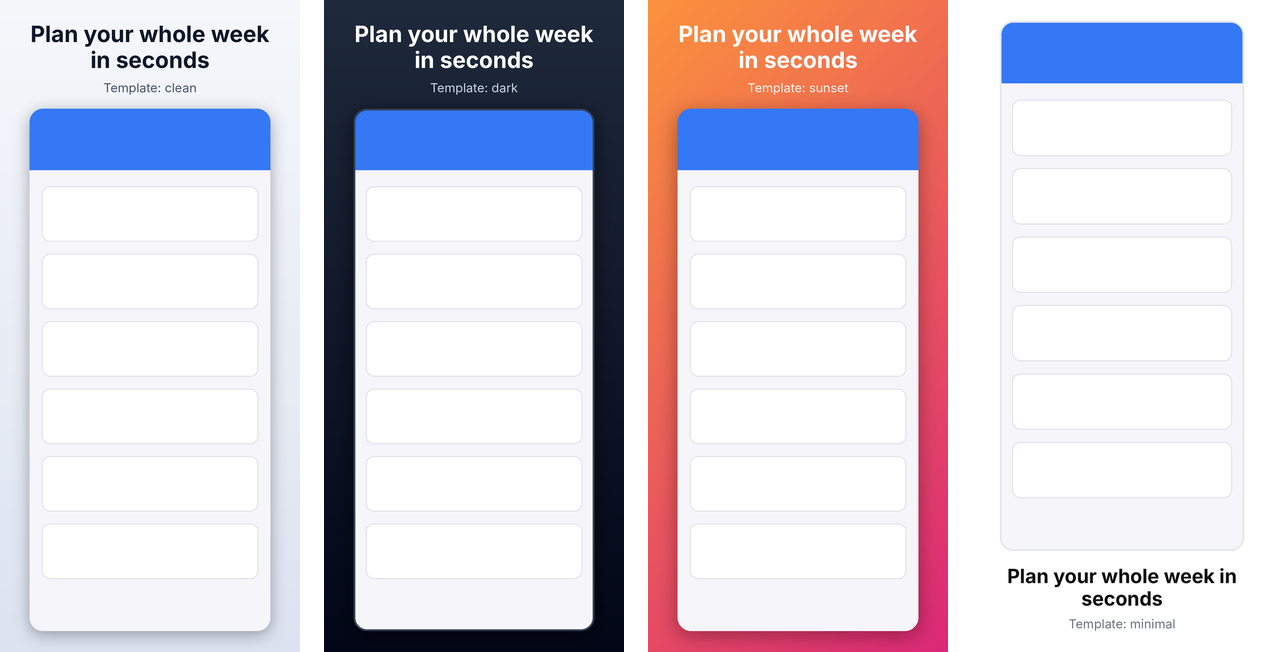
A template puts the screenshot on a styled canvas with a caption and optional subtitle. Every size is a fraction of the canvas's shorter side, so one template works for iPhone, iPad, landscape and Google sizes alike. Captions wrap, shrink to fit, and are cut off with a warning only if they still don't fit at the minimum size.
app-preview templates                   # list built-ins
app-preview templates dark              # every setting of one template
app-preview generate shot.png -t apple.iphone-6.9 --template sunset --caption "Plan your week" --subtitle "In seconds"
app-preview generate shot.png -t apple.iphone-6.9 --caption "Sync everywhere" --badge Pro --caption-width 0.7 --caption-weight semibold
--caption-width narrows the text column (a fraction of the canvas width), --caption-weight picks the caption's font weight, and --badge adds a pill above the caption, e.g. to mark a paid feature. Templates set the same things with max_width, weight and the badge section.
| Template | Look |
|---|---|
clean | Soft light gradient, dark bold caption on top, rounded screenshot with shadow. |
dark | Deep navy gradient with white caption; good for dark-mode apps. |
minimal | Plain white background, caption below the screenshot, no shadow. |
sunset | Vibrant orange-to-pink diagonal gradient with white caption. |
Custom templates
Write YAML, usually extending a built-in and changing a few settings:
# brand.yaml
extends: dark
background:
  gradient: {from: "#4F46E5", to: "#0EA5E9", angle: 135}   # or {color: ...} or {image: bg.png}
caption: {color: "#FFFFFF", font: fonts/Brand-Bold.ttf, size: 0.08, max_width: 0.75}
subtitle: {color: "#E0E7FF", weight: light}                  # thin ... black, or 100-900
caption_position: top                                        # or bottom
badge: {position: above, background: "#FACC15", color: "#111111"}   # or below
screenshot: {max_width: 0.8, corner_radius: 0.05, shadow: {blur: 0.03}, frame: phone}
Use it with --template brand.yaml or template: brand.yaml in the config. Relative paths (fonts, background images, frames) resolve against the file that declares them. Gradient angles follow CSS: 180 runs top to bottom and 90 left to right. All settings are listed in the template reference; app-preview schema template prints the JSON Schema.
The default font is Inter, bundled as a variable font under the SIL Open Font License, so output looks the same on every machine and every weight from 100 to 900 is available. A custom variable font with a weight axis uses weight too; a static font file keeps its own weight. It covers Latin, Greek and Cyrillic; see Localization for other scripts.
Templates are refused (template_not_allowed) for targets where the store forbids added text or backgrounds: Wear OS, Android Automotive, and app icons.
Device frames
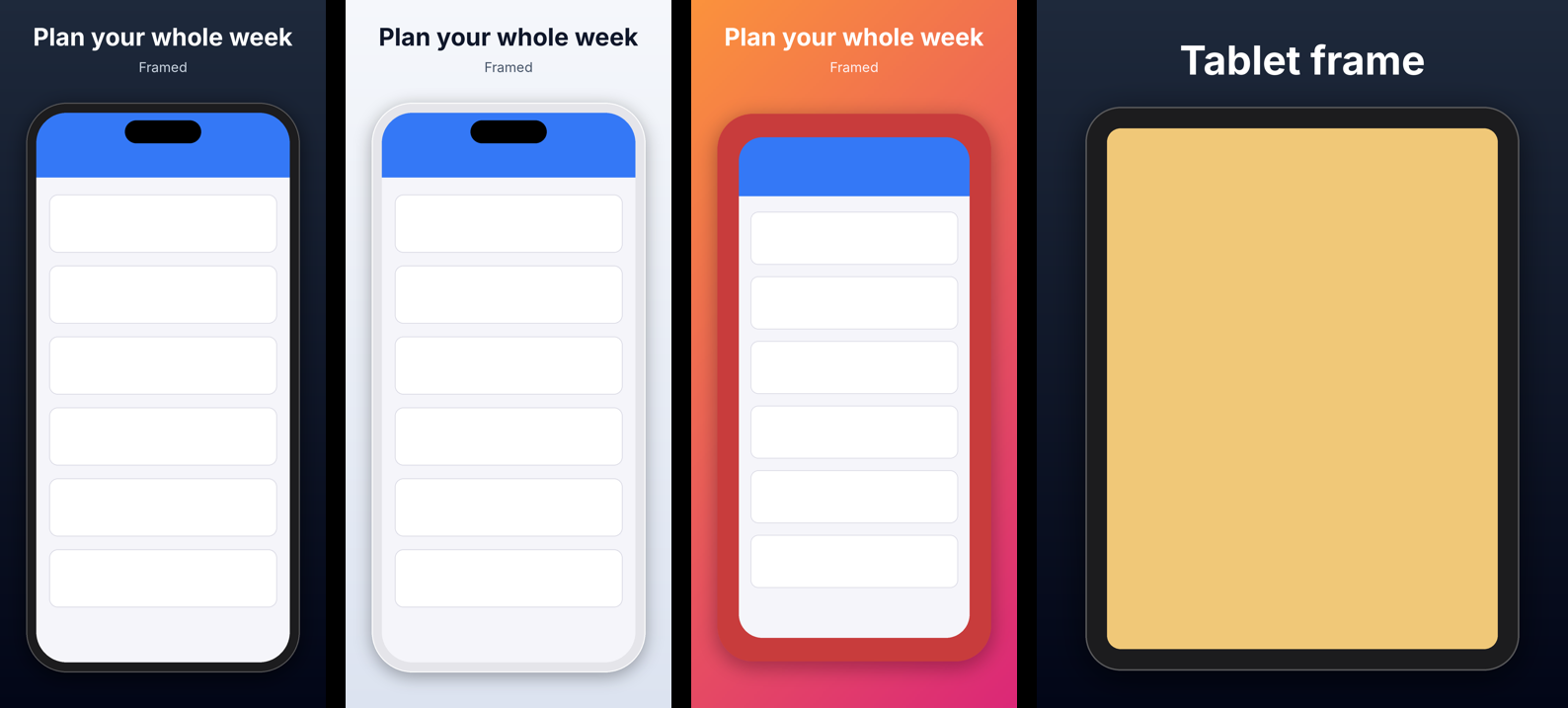
app-preview frames
app-preview generate shot.png -t apple.iphone-6.9 --frame phone --caption "Plan your week"| Frame | Description |
|---|---|
auto | Phone or tablet, chosen from the screenshot's aspect ratio |
phone | Modern phone with thin bezels and a Dynamic Island-style cutout |
tablet | Tablet with even bezels |
Built-in frames are drawn to fit each screenshot exactly, in portrait or landscape, so nothing is stretched or cropped. In a template you can set details:
screenshot:
  frame: {name: phone, color: "#E5E5EA", island: false}
Your own device artwork
Point frame at any PNG whose screen area is transparent, such as product bezels you have downloaded (Apple's are subject to Apple's terms and aren't bundled). The screen is found automatically by flood-filling from the image center. If that doesn't work for your image, use a small manifest:
# my-frame.yaml
image: my-phone-frame.png
screen: [72, 69, 1206, 2622]     # x, y, width, height of the screen in the PNG
A screenshot whose shape doesn't match the frame's screen is cropped to fill it, with a warning. Frames are refused for Wear OS and Android Automotive, where Google forbids them.
Project config & build
For a whole store listing, describe it once in app-preview.yaml and run app-preview build.
version: 1
out: store-screenshots
targets: [apple.iphone-6.9, apple.ipad-13, google.phone, apple.iphone-6.9-preview]
locales: [en-US, de-DE, ja-JP]
template: clean                       # name, path, or inline {extends: ..., ...}
layout: default                       # or fastlane / gpp
locale_overrides:
  ja: {caption: {font: fonts/NotoSansJP-Bold.otf}}
screens:
  - id: home
    source: shots/{locale}/home.png   # {locale}, {target}, {screen} are substituted
    caption: {en: "Plan your week", de: "Plane deine Woche", ja: "一週間をすばやく計画"}
  - id: detail
    source:                           # per-target sources; keys can be globs
      apple.ipad-*: shots/{locale}/ipad/detail.png
      default: shots/{locale}/detail.png
    caption: {default: "Every detail, one tap away"}
    badge: {default: Pro, de: Profi}       # optional pill, e.g. for paid features
    template: {caption_position: bottom}   # per-screen overrides
  - id: demo
    source: recordings/demo.mov       # video sources go to *-preview targets only
    caption: {default: "See it in action"}
    start: 4
graphics:
  - target: google.feature-graphic
    title: Weekly Planner
    subtitle: {en: "Plan in seconds", de: "Plane in Sekunden"}
    icon: assets/icon.png
app-preview build --dry-run # check the config and list every output
app-preview build # render and validate
app-preview build -t google.phone -l de-DE --layout fastlane- Which screens go where. A screen applies to a target when it has a source for it of the right kind: images for screenshot targets, recordings for
-previewtargets. - Output. Files go to
out/<locale>/<target>/NN_<screen>.pngand each locale × target set is validated. - Errors up front. Mistakes are reported before anything is rendered, and every missing source file is listed at once.
Every field is in the config reference. app-preview schema config prints the JSON Schema, for editors and agents.
Localization
- Localized text. Captions, subtitles and graphic titles accept a mapping of locale to text. A missing locale falls back to its language (
de-DE→de), then todefault; if neither exists you getmissing_text. - Fonts per language.
locale_overridesapplies template overrides by locale or language, mainly to set fonts for scripts Inter doesn't cover. Noto fonts cover almost every language. - Missing glyphs are caught. If the font can't draw some characters, the output gets a warning naming them instead of silently showing boxes.
- Right-to-left scripts. Arabic, Hebrew, Persian and Urdu are shaped and laid out right to left with libraqm (bundled with Pillow's wheels). The template's left/right alignment is mirrored, and graphics put the icon on the right.
- CJK text, which has no spaces, wraps between characters.
- Store locale codes. The stores spell some locales differently (
javsja-JP,hevsiw-IL,zh-Hansvszh-CN).app-preview locales CODEshows each store's code,buildwarns about locales a store doesn't support, and the upload layouts use each store's own codes for folder names.
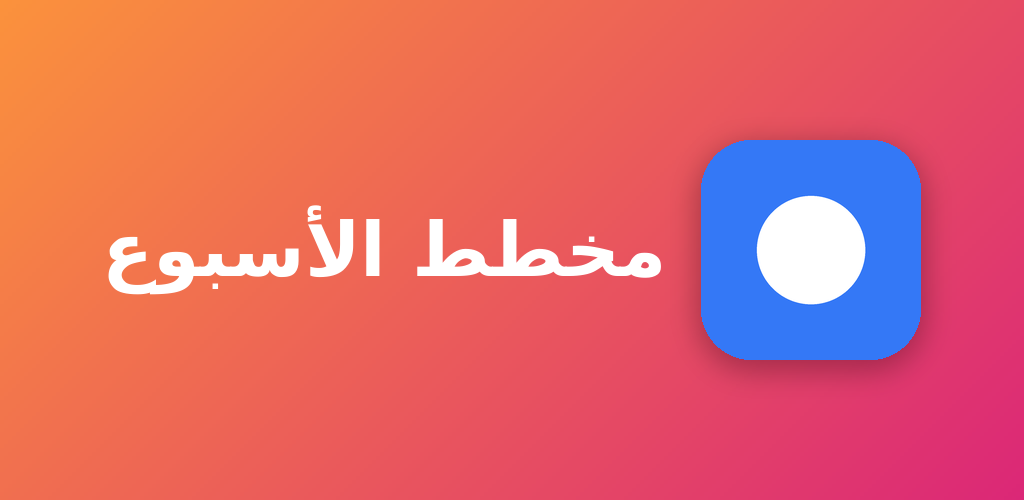
One-off commands take --locale for direction and shaping: app-preview generate shot.png -t apple.iphone-6.9 --caption "خطط لأسبوعك" --locale ar.
Store graphics & icons
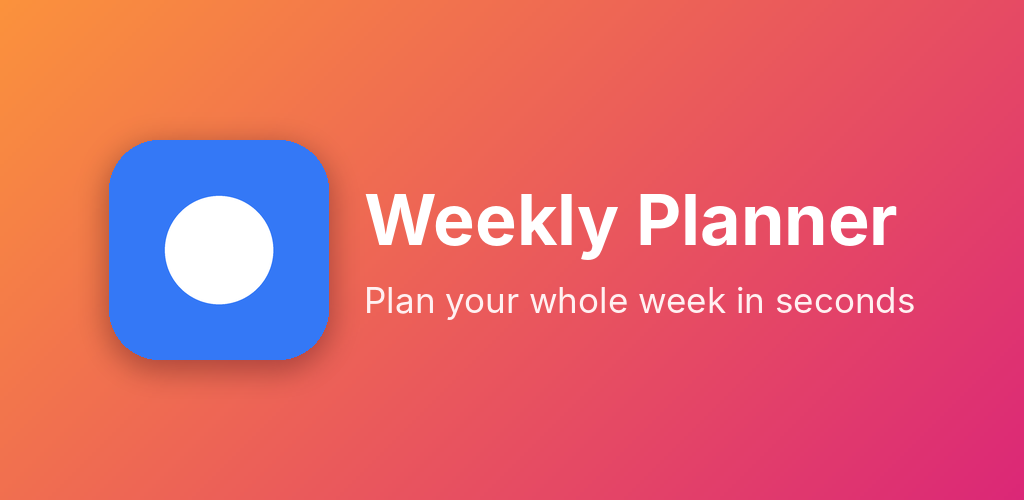
app-preview graphic -t google.feature-graphic --title "Weekly Planner" --subtitle "Plan in seconds" --icon icon.png --template sunset
app-preview graphic -t google.tv-banner --title "Weekly Planner" --icon icon.png -o banner.png
The Play feature graphic (1024×500) and TV banner (1280×720) are built from your app name, an optional tagline and your icon, in any template's colors and fonts. Text tries to fit on one line before wrapping. The icon and text stay inside the central 80% because Google crops feature graphics in some places. In a config, list them under graphics:.
App icons are plain resizes: app-preview generate icon.png -t google.icon -t apple.icon gives a 512×512 Play icon (transparency kept) and a 1024×1024 opaque App Store icon.
App preview videos
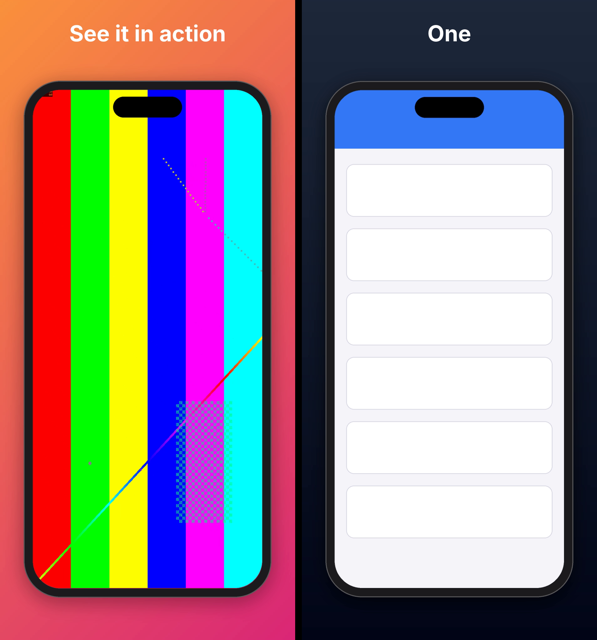
App Store app previews are optional 15–30 second videos with strict encoding rules. These features need ffmpeg (brew install ffmpeg or apt install ffmpeg).
app-preview validate demo.mov -t apple.iphone-6.9-preview
app-preview generate demo.mov -t apple.iphone-6.9-preview -t apple.ipad-13-preview --start 3
app-preview generate demo.mov -t apple.iphone-6.9-preview --template dark --frame phone --caption "See it in action"
app-preview slideshow shots/*.png -t apple.iphone-6.9-preview --template clean --caption A --caption B --caption C
What is checked
- Container and codec:
.mp4,.movor.m4v; H.264 up to High Profile Level 4.0, or ProRes 422 HQ in.mov. - Picture: an exact accepted resolution, 15–30 seconds, at most 30 fps.
- Audio: stereo AAC (or PCM for ProRes) at 44.1 or 48 kHz. A silent track is fine; no track at all isn't.
- Limits: 500 MB per file and up to 3 previews per device size and language.
What generate does
- Size and frame rate. Scales to the accepted size (886×1920 for most iPhones, 1200×1600 for iPads) and caps the frame rate at 30 fps.
- Length. Trims to 30 s; choose the segment with
--start. Clips under 15 s are refused unless you pass--extend, which holds the last frame. - Encoding. H.264 High@4.0 at about 11 Mbps with 256 kbps stereo AAC; a silent track is added if the recording has none.
- Vision Pro. Its previews (3840×2160) are beyond H.264 Level 4.0, so they're encoded as ProRes 422 HQ
.mov. - Templates and frames work as for screenshots: the recording plays inside the screen area, under the caption.
slideshow turns screenshots into a preview with crossfades and fits the total into 15–30 s automatically (or set --seconds per slide). Previews show a poster frame from 5 s in by default; with fastlane, change it with deliver's preview_frame_time_code.
Google Play's promo video is a YouTube URL entered in Play Console, not an uploaded file, so there's nothing to generate for it.
Capturing screenshots
app-preview capture simulators                      # which simulator fits which Apple target
app-preview capture ios -o shots/en-US/home.png     # --device "iPhone 17 Pro Max" if several are booted
app-preview capture android -o shots/en-US/home.png # --device emulator-5554 if several are connected
Capture takes a screenshot straight from a running iOS Simulator (macOS with Xcode, via xcrun simctl) or an Android emulator or device (via adb). It first sets a clean status bar: 9:41, full battery and signal, and on Android no notifications. Each capture reports which targets it already fits.
The status bar overrides stay on so a series of shots looks consistent. Reset them with xcrun simctl status_bar booted clear or adb shell am broadcast -a com.android.systemui.demo -e command exit.
Modern Android phones are taller than Google Play's 2:1 limit, so run Android captures through generate or a template before uploading.
Upload layouts
With --layout (or layout: in the config), output goes straight into the folders your upload tool reads:
| Layout | Apple | |
|---|---|---|
default | out/<locale>/<target>/ | out/<locale>/<target>/ |
fastlane | out/fastlane/screenshots/<locale>/out/fastlane/app_previews/<locale>/ | out/fastlane/metadata/android/<locale>/images/phoneScreenshots/, featureGraphic.png, … |
gpp | same as fastlane | out/play/listings/<locale>/graphics/phone-screenshots/, feature-graphic/, … |
- Locale folders use each store's codes:
ja-JPin your config becomesjafor Apple;hebecomesiw-ILfor Google. - Apple devices. deliver identifies devices by pixel size. iPad Pro 12.9" (2nd gen) files get the
APP_IPAD_PRO_129marker so they don't land in the 13" slot. Preview files are prefixed with their App Store Connect type, such asIPHONE_67_. - Same-size targets. Apple TV and Vision Pro share a size that deliver can't tell apart, so you get a warning; build them separately.
- Unsupported targets. Targets an upload tool has no folder for (Chromebook, XR, Automotive,
apple.icon) are skipped with a warning.
# Fastfile
deliver(screenshots_path: "out/fastlane/screenshots", app_previews_path: "out/fastlane/app_previews")
supply(metadata_path: "out/fastlane/metadata/android")
For Gradle Play Publisher, copy out/play into your app module's src/main/play.
AI agents & JSON
app-preview never prompts and is safe to run unattended. With --json, stdout is a single JSON document:
{
  "ok": false,
  "target": "apple.iphone-6.9",
  "files": [{
    "path": "shots/home.png", "ok": false, "width": 1179, "height": 2556, "format": "png",
    "issues": [{"severity": "error", "code": "dimensions",
                "message": "1179x2556 is not an accepted size; ...",
                "fix": "Run `app-preview generate shots/home.png --target apple.iphone-6.9` ..."}]
  }],
  "set_issues": [],
  "summary": {"files": 1, "errors": 1, "warnings": 0}
}
Usage and input errors use the same shape with exit code 2: {"ok": false, "error": {"code": "unknown_target", "message": "..."}}. A recommended flow for agents:
app-preview targets --jsonto choose targets.app-preview schema config, then writeapp-preview.yaml.app-preview build --dry-run --jsonto check the config and see every output.app-preview build --json, then readok,outputs[].warnings,warnings[]andvalidation[].
The repository's AGENTS.md has more recipes.
MCP server
app-preview mcp runs a stdio Model Context Protocol server that offers the same features as tools. It needs the optional extra and works with the MCP Python SDK 1.x and 2.x.
pipx install "app-preview[mcp]"
claude mcp add app-preview -- app-preview mcp          # Claude Code
{
"mcpServers": {
"app-preview": {"command": "uvx", "args": ["--from", "app-preview[mcp]", "app-preview", "mcp"]}
}
}| Tool | Kind | What it does |
|---|---|---|
list_targets | read-only | List store targets. kind is screenshot, graphic, icon or video. Returns compact entries; call get_target for the full spec. |
get_target | read-only | Full spec for one target: sizes or size rules, formats, transparency, limits, notes, source. |
validate | read-only | Check images or videos against a target. Every problem is reported with a stable code. |
identify | read-only | Which targets each file already satisfies without changes. |
list_templates | read-only | Built-in templates with every setting; pass a name as template, or extend one. |
schema | read-only | JSON Schema for app-preview.yaml (config) or for template files (template). |
locales | read-only | Map a locale (e.g. ja-JP, he) to each store's code, or list store locale codes. |
generate | writes files | Make compliant copies of screenshots (or, for *-preview targets, recordings) for each target. template/captions/frame give styled marketing screenshots; captions/subtitles/badges are one per input (a badge such as "PRO" marks a paid feature). caption_width is the max text width as a fraction of the canvas; caption_weight is regular, medium, semibold, bold, ... or 100-900. |
build | writes files | Render everything in an app-preview.yaml (screens x targets x locales, plus graphics), then validate. Use dry_run=true first: it checks the config and lists all outputs. |
graphic | writes files | Render a Google Play feature graphic or TV banner from a title, tagline and app icon. |
slideshow | writes files | Turn screenshots into an App Store preview video (*-preview targets). Needs ffmpeg. |
init_config | writes files | Write a commented starter app-preview.yaml. Refuses to overwrite unless force=true. |
capture | writes files | Screenshot a booted iOS Simulator (macOS + Xcode) or Android emulator/device (adb), with a clean status bar. Returns the targets the capture already fits. |
Tools return the same JSON as --json. Errors come back as data ({"ok": false, "error": {...}}) so the agent sees the error code. Relative paths resolve against the server's working directory, so start it from your project folder.
GitHub Action
jobs:
  store-assets:
    runs-on: ubuntu-latest
    steps:
      - uses: actions/checkout@v4
      - id: assets
        uses: Dev101911/AppPreviewGenerator@v0
        with:
          args: build --layout fastlane      # any app-preview command line
          # install-ffmpeg: true             # for app preview videos
          # python-version: "3.12"
          # working-directory: app/
      - run: echo "ok=${{ steps.assets.outputs.ok }}, result in ${{ steps.assets.outputs.result }}"
The action installs the matching app-preview version and runs your command with --json. It writes a summary table to the job page and fails the step when validation fails. Outputs:
ok:"true"or"false".result: the path to the JSON result.
Python API
The package installs as app-preview and is imported as apppreview (Python module names can't contain hyphens).
from apppreview import generate, generate_graphic, validate_images, identify

report = validate_images(["shot.png"], "apple.iphone-6.9")
print(report.ok, report.to_dict()["summary"])

result = generate(["shot.png"], ["apple.iphone-6.9", "google.phone"], out_dir="out",
                  template="dark", captions=["Plan your week"], frame="phone")
for output in result.outputs:
    print(output.path, output.warnings)
Builds are available as apppreview.config.build(path). Errors raise apppreview.errors.AppPreviewError, which carries .code and .message.
Commands
Every command accepts -h/--help; all but schema and mcp accept --json.
app-preview build
Render every screen x target x locale defined in CONFIG (default: app-preview.yaml).
app-preview build [OPTIONS] [CONFIG]| Option | Type | Default | Description |
|---|---|---|---|
CONFIG | argument | app-preview.yaml | |
-t, --target repeatable | text | Only build these targets. | |
-l, --locale repeatable | text | Only build these locales. | |
--dry-run | flag | Check the config and list outputs without rendering. | |
--layout | default | fastlane | gpp | Override the config's layout: default, fastlane (deliver/supply) or gpp (Gradle Play Publisher). | |
--json | flag | Write machine-readable JSON to stdout. |
Examples
app-preview build
app-preview build -t apple.iphone-6.9 -l de-DE --dry-run --json
app-preview build --layout fastlane
app-preview capture android
Screenshot an Android emulator or device over adb. Demo mode stays on until adb shell am broadcast -a com.android.systemui.demo -e command exit.
app-preview capture android [OPTIONS]| Option | Type | Default | Description |
|---|---|---|---|
-o, --out | path | PNG file to write. | |
--device | text | adb serial, if more than one device is connected. | |
--no-demo-mode | flag | Leave the status bar as is (default: demo mode, 09:41). | |
--json | flag | Write machine-readable JSON to stdout. |
Examples
app-preview capture android -o shots/en-US/home.pngapp-preview capture ios
Screenshot a booted iOS Simulator (needs Xcode). The status bar override stays until xcrun simctl status_bar booted clear.
app-preview capture ios [OPTIONS]| Option | Type | Default | Description |
|---|---|---|---|
-o, --out | path | PNG file to write. | |
--device | text | Simulator name or UDID, if more than one is booted. | |
--no-status-bar | flag | Leave the status bar as is (default: 9:41, full bars). | |
--json | flag | Write machine-readable JSON to stdout. |
Examples
app-preview capture ios -o shots/en-US/home.png --device "iPhone 17 Pro Max"app-preview capture simulators
Which iOS simulators produce screenshots that fit each Apple target without resizing.
app-preview capture simulators [OPTIONS]| Option | Type | Default | Description |
|---|---|---|---|
--json | flag | Write machine-readable JSON to stdout. |
Examples
app-preview capture simulatorsapp-preview frames
List built-in device frames. Custom frames are PNGs with a transparent screen.
app-preview frames [OPTIONS]| Option | Type | Default | Description |
|---|---|---|---|
--json | flag | Write machine-readable JSON to stdout. |
Examples
app-preview frames --jsonapp-preview generate
Resize IMAGES into compliant screenshots for one or more targets.
Output goes to OUT/<target-id>/NN_<name>.<ext> and is re-validated. With --template or --caption, screenshots are placed on a styled canvas.
app-preview generate [OPTIONS] IMAGES...| Option | Type | Default | Description |
|---|---|---|---|
IMAGES | argument (repeatable) | ||
-t, --target repeatable | text | Target ID; repeat for several. | |
-o, --out | text | app-preview-out | Output directory. |
--mode | fit | fill | stretch | fit | fit: letterbox on background; fill: center-crop; stretch: distort. |
--background | text | #ffffff | Letterbox/flatten color: name, #RRGGBB, or 'auto' (matches the image edges). |
--format | png | jpeg | Output format [default: png]. | |
--size | text | Exact output size WIDTHxHEIGHT; must be accepted by every target. | |
--dry-run | flag | Report what would be written without writing files. | |
--template | text | Template name (see app-preview templates) or template .yaml path. | |
--caption repeatable | text | Caption per image, in order. Implies a template. | |
--subtitle repeatable | text | Subtitle per image, in order. | |
--badge repeatable | text | Badge per image, in order (e.g. PRO). Implies a template. | |
--caption-width | float range | Max text width, fraction of the canvas width. | |
--caption-weight | weight | Caption weight: regular, semibold, bold, ... or 100-900. | |
--locale | text | Language of the captions (e.g. ar, ja-JP), for text direction and shaping. | |
--frame | text | Device frame: auto, phone, tablet, or a frame .png/.yaml path. Implies a template. | |
--start | number | Videos: start time in seconds (output is at most 30s). | |
--extend | flag | Videos: hold the last frame to reach the 15s minimum. | |
--layout | default | fastlane | gpp | Folder layout: default, fastlane (deliver/supply) or gpp (Gradle Play Publisher). | |
--json | flag | Write machine-readable JSON to stdout. |
Examples
app-preview generate raw/*.png -t apple.iphone-6.9 -t apple.ipad-13 -t google.phone -o out
app-preview generate shot.png -t apple.iphone-6.9 --template dark --frame phone --caption "Plan your week"
app-preview generate demo.mov -t apple.iphone-6.9-preview --start 3
app-preview graphic
Render a store graphic (feature graphic, TV banner) from a title and app icon.
app-preview graphic [OPTIONS]| Option | Type | Default | Description |
|---|---|---|---|
-t, --target | text | google.feature-graphic or google.tv-banner. | |
--title | text | Main text, usually the app name. | |
--subtitle | text | Optional tagline. | |
--icon | path | App icon image, shown left of the text. | |
--template | text | clean | Template for background, colors and fonts. |
-o, --out | text | app-preview-out | Output file or directory. |
--format | png | jpeg | Output format [default: png]. | |
--dry-run | flag | Report what would be written without writing files. | |
--locale | text | Language of the text (e.g. ar, ja-JP), for text direction and shaping. | |
--layout | default | fastlane | gpp | Folder layout: default, fastlane (deliver/supply) or gpp (Gradle Play Publisher). | |
--json | flag | Write machine-readable JSON to stdout. |
Examples
app-preview graphic -t google.feature-graphic --title "Weekly Planner" --subtitle "Plan in seconds" --icon icon.pngapp-preview identify
Show which targets each image already satisfies as-is.
app-preview identify [OPTIONS] IMAGES...| Option | Type | Default | Description |
|---|---|---|---|
IMAGES | argument (repeatable) | ||
--store | apple | google | Only consider one store. | |
--json | flag | Write machine-readable JSON to stdout. |
Examples
app-preview identify shot.png --store googleapp-preview init
Write a starter app-preview.yaml.
app-preview init [OPTIONS] [PATH]| Option | Type | Default | Description |
|---|---|---|---|
PATH | argument | app-preview.yaml | |
--force | flag | Overwrite an existing file. | |
--json | flag | Write machine-readable JSON to stdout. |
Examples
app-preview init
app-preview init marketing/app-preview.yaml
app-preview locales
List store locale codes, or show how LOCALE maps to each store's code.
app-preview locales [OPTIONS] [LOCALE]| Option | Type | Default | Description |
|---|---|---|---|
LOCALE | argument | ||
--store | apple | google | Only list one store's locale codes. | |
--json | flag | Write machine-readable JSON to stdout. |
Examples
app-preview locales ja-JP
app-preview locales --store google
app-preview mcp
Run an MCP server over stdio, exposing app-preview as tools for AI agents.
Needs the extra: pip install "app-preview[mcp]".
app-preview mcp [OPTIONS]Examples
claude mcp add app-preview -- app-preview mcpapp-preview schema
Print the JSON Schema for the config file or for templates.
app-preview schema [OPTIONS] {config|template}| Option | Type | Default | Description |
|---|---|---|---|
KIND | argument |
Examples
app-preview schema config > app-preview.schema.jsonapp-preview slideshow
Turn screenshots into an app preview video with crossfades (silent audio).
app-preview slideshow [OPTIONS] IMAGES...| Option | Type | Default | Description |
|---|---|---|---|
IMAGES | argument (repeatable) | ||
-t, --target repeatable | text | Preview target, e.g. apple.iphone-6.9-preview. | |
-o, --out | text | app-preview-out | Output directory. |
--seconds | number | Seconds per slide [default: fit the total into 15-30s]. | |
--transition | number | 0.5 | Crossfade length in seconds. |
--template | text | Template for every slide. | |
--caption repeatable | text | Caption per image, in order. Implies a template. | |
--frame | text | Device frame for every slide. Implies a template. | |
--badge repeatable | text | Badge per image, in order (e.g. PRO). Implies a template. | |
--caption-width | float range | Max text width, fraction of the canvas width. | |
--caption-weight | weight | Caption weight: regular, semibold, bold, ... or 100-900. | |
--locale | text | Language of the captions. | |
--layout | default | fastlane | gpp | Folder layout: default, fastlane or gpp. | |
--dry-run | flag | Report what would be written without writing files. | |
--json | flag | Write machine-readable JSON to stdout. |
Examples
app-preview slideshow shots/*.png -t apple.iphone-6.9-preview --template clean --frame phoneapp-preview targets
List screenshot targets, or show details for TARGET_ID.
app-preview targets [OPTIONS] [TARGET_ID]| Option | Type | Default | Description |
|---|---|---|---|
TARGET_ID | argument | ||
--store | apple | google | Only list targets for one store. | |
--json | flag | Write machine-readable JSON to stdout. |
Examples
app-preview targets --store apple
app-preview targets apple.iphone-6.9 --json
app-preview templates
List built-in templates, or show one template's full settings.
app-preview templates [OPTIONS] [NAME]| Option | Type | Default | Description |
|---|---|---|---|
NAME | argument | ||
--json | flag | Write machine-readable JSON to stdout. |
Examples
app-preview templates
app-preview templates sunset
app-preview validate
Check IMAGES against a target's store requirements.
app-preview validate [OPTIONS] IMAGES...| Option | Type | Default | Description |
|---|---|---|---|
IMAGES | argument (repeatable) | ||
-t, --target | text | Target ID, e.g. apple.iphone-6.9. | |
--json | flag | Write machine-readable JSON to stdout. |
Examples
app-preview validate shots/*.png -t apple.iphone-6.9
app-preview validate demo.mov -t apple.iphone-6.9-preview --json
Targets
All 46 targets, generated from the bundled spec data. app-preview targets ID --json returns the full record for one target.
Apple screenshots
| ID | Name | Accepted sizes (px) | Formats | Count | Notes |
|---|---|---|---|---|---|
apple.iphone-duo-outer | iPhone Duo (outer display) | 1398×2034, 2034×1398 | png/jpeg | 1–10 | Required from April 2027 for apps built with the iOS 27.1 SDK or later. |
apple.iphone-duo-inner | iPhone Duo (inner display) | 2007×2853, 2853×2007 | png/jpeg | 1–10 | Required from April 2027 for apps built with the iOS 27.1 SDK or later. |
apple.iphone-6.9 | iPhone 6.9" (Dynamic Island, large) | 1320×2868, 1290×2796, 1260×2736, 2868×1320, 2796×1290, 2736×1260 | png/jpeg | 1–10 | Falls back to apple.iphone-6.5. |
apple.iphone-6.5 | iPhone 6.5" (Face ID, large) | 1284×2778, 1242×2688, 2778×1284, 2688×1242 | png/jpeg | 1–10 | Required for iPhone apps if 6.9" (Dynamic Island, large) screenshots are not provided. |
apple.iphone-6.3 | iPhone 6.3" (Dynamic Island, medium) | 1206×2622, 1179×2556, 2622×1206, 2556×1179 | png/jpeg | 1–10 | Required for iPhone apps. Falls back to apple.iphone-6.5. |
apple.iphone-6.1 | iPhone 6.1" (Face ID, medium) | 1170×2532, 1125×2436, 1080×2340, 2532×1170, 2436×1125, 2340×1080 | png/jpeg | 1–10 | Falls back to apple.iphone-6.3. |
apple.iphone-5.5 | iPhone 5.5" (Home button, large) | 1242×2208, 2208×1242 | png/jpeg | 1–10 | Falls back to apple.iphone-6.1. |
apple.iphone-4.7 | iPhone 4.7" (Home button, medium) | 750×1334, 1334×750 | png/jpeg | 1–10 | Falls back to apple.iphone-5.5. |
apple.iphone-4 | iPhone 4" (Home button) | 640×1136, 640×1096, 1136×640, 1136×600 | png/jpeg | 1–10 | Falls back to apple.iphone-4.7. |
apple.iphone-3.5 | iPhone 3.5" (Home button) | 640×960, 640×920, 960×640, 960×600 | png/jpeg | 1–10 | Falls back to apple.iphone-4. |
apple.ipad-13 | iPad 13" | 2064×2752, 2048×2732, 2752×2064, 2732×2048 | png/jpeg | 1–10 | Required for apps that run on iPad. |
apple.ipad-12.9 | iPad Pro 12.9" (2nd generation) | 2048×2732, 2732×2048 | png/jpeg | 1–10 | Falls back to apple.ipad-13. |
apple.ipad-11 | iPad 11" | 1668×2420, 1668×2388, 1640×2360, 1488×2266, 2420×1668, 2388×1668, 2360×1640, 2266×1488 | png/jpeg | 1–10 | Falls back to apple.ipad-13. |
apple.ipad-10.5 | iPad 10.5" | 1668×2224, 2224×1668 | png/jpeg | 1–10 | Falls back to apple.ipad-12.9. |
apple.ipad-9.7 | iPad 9.7" | 1536×2048, 1536×2008, 768×1024, 768×1004, 2048×1536, 2048×1496, 1024×768, 1024×748 | png/jpeg | 1–10 | Falls back to apple.ipad-10.5. |
apple.mac | Mac | 2880×1800, 2560×1600, 1440×900, 1280×800 | png/jpeg | 1–10 | Required for Mac apps. |
apple.tv | Apple TV | 3840×2160, 1920×1080 | png/jpeg | 1–10 | Required for Apple TV apps. |
apple.vision-pro | Apple Vision Pro | 3840×2160 | png/jpeg | 1–10 | Required for Apple Vision Pro apps. |
apple.watch | Apple Watch | 422×514, 416×496, 410×502, 396×484, 368×448, 312×390 | png/jpeg | 1–10 | Required for Apple Watch apps. |
Apple app previews (video)
| ID | Name | Accepted sizes (px) | Formats | Count | Notes |
|---|---|---|---|---|---|
apple.iphone-6.9-preview | iPhone 6.9" app preview | 886×1920, 1920×886 | mp4/mov/m4v | 1–3 | Preview type IPHONE_67. |
apple.iphone-6.5-preview | iPhone 6.5" app preview | 886×1920, 1920×886 | mp4/mov/m4v | 1–3 | Preview type IPHONE_65. |
apple.iphone-6.3-preview | iPhone 6.3" app preview | 886×1920, 1920×886 | mp4/mov/m4v | 1–3 | Preview type IPHONE_61. |
apple.iphone-6.1-preview | iPhone 6.1" (Face ID, medium) app preview | 886×1920, 1920×886 | mp4/mov/m4v | 1–3 | Preview type IPHONE_58. |
apple.iphone-5.5-preview | iPhone 5.5" app preview | 1080×1920, 1920×1080 | mp4/mov/m4v | 1–3 | Preview type IPHONE_55. |
apple.iphone-4.7-preview | iPhone 4.7" app preview | 750×1334, 1334×750 | mp4/mov/m4v | 1–3 | Preview type IPHONE_47. |
apple.iphone-4-preview | iPhone 4" app preview | 1080×1920, 1920×1080 | mp4/mov/m4v | 1–3 | Preview type IPHONE_40. |
apple.ipad-13-preview | iPad 13" app preview | 1200×1600, 1600×1200 | mp4/mov/m4v | 1–3 | Preview type IPAD_PRO_3GEN_129. |
apple.ipad-12.9-preview | iPad Pro 12.9" (2nd gen) app preview | 1200×1600, 900×1200, 1600×1200, 1200×900 | mp4/mov/m4v | 1–3 | Preview type IPAD_PRO_129. |
apple.ipad-11-preview | iPad 11" app preview | 1200×1600, 1600×1200 | mp4/mov/m4v | 1–3 | Preview type IPAD_PRO_3GEN_11. |
apple.ipad-10.5-preview | iPad 10.5" app preview | 1200×1600, 1600×1200 | mp4/mov/m4v | 1–3 | Preview type IPAD_105. |
apple.ipad-9.7-preview | iPad 9.7" app preview | 900×1200, 1200×900 | mp4/mov/m4v | 1–3 | Preview type IPAD_97. |
apple.mac-preview | Mac app preview | 1920×1080 | mp4/mov/m4v | 1–3 | Preview type DESKTOP. |
apple.tv-preview | Apple TV app preview | 1920×1080 | mp4/mov/m4v | 1–3 | Preview type APPLE_TV. |
apple.vision-pro-preview | Apple Vision Pro app preview | 3840×2160 | mp4/mov/m4v | 1–3 | Preview type APPLE_VISION_PRO. |
Google Play screenshots
| ID | Name | Accepted sizes (px) | Formats | Count | Notes |
|---|---|---|---|---|---|
google.phone | Phone | short side ≥ 320; long side ≤ 3840; ≤ 2:1 generates 1080×1920, 1920×1080 | png/jpeg | 2–8 | |
google.tablet-7 | 7-inch tablet | short side ≥ 1080; long side ≤ 7680; 9:16 or 16:9 generates 1080×1920, 1920×1080 | png/jpeg | 4–8 | |
google.tablet-10 | 10-inch tablet | short side ≥ 1080; long side ≤ 7680; 9:16 or 16:9 generates 1440×2560, 2560×1440 | png/jpeg | 4–8 | |
google.chromebook | Chromebook | short side ≥ 1080; long side ≤ 7680; 9:16 or 16:9 generates 1920×1080, 1080×1920 | png/jpeg | 4–8 | |
google.wear-os | Wear OS | short side ≥ 384; long side ≤ 3840; 1:1 generates 384×384 | png/jpeg | 1–8 | No templates or frames. |
google.tv | Android TV | short side ≥ 320; long side ≤ 3840; ≤ 2:1 generates 1920×1080 | png/jpeg | 1–8 | At least one TV screenshot (and a TV banner) is required for Android TV apps. |
google.xr | Android XR | short side ≥ 1200; long side ≤ 3840; 8:5 generates 3840×2400 | png/jpeg | 4–8 | |
google.automotive | Android Automotive OS | 800×1280, 1024×768 | png/jpeg | 4–8 | No templates or frames. |
Store graphics and icons
| ID | Name | Accepted sizes (px) | Formats | Count | Notes |
|---|---|---|---|---|---|
apple.icon | App Store icon | 1024×1024 | png | 1 | No templates or frames. |
google.feature-graphic | Feature graphic | 1024×500 | png/jpeg | 1 | |
google.tv-banner | Android TV banner | 1280×720 | png/jpeg | 1 | |
google.icon | App icon | 512×512 | png, alpha OK | 1 | No templates or frames. |
Sources: App Store specs (verified 2026-10-12), Google Play specs (verified 2026-10-12), App preview specs (verified 2026-10-12).
Config file reference
Fields of app-preview.yaml (JSON also works). Paths are relative to the config file. Generated from the schema that app-preview schema config prints.
| Field | Type | Default | Description |
|---|---|---|---|
version | 1 | 1 | |
out | text | "app-preview-out" | Output directory, relative to the config file |
targets | list of text | Screenshot target IDs; see app-preview targets | |
locales | list of text | Locale codes, e.g. en-US; empty for a single set | |
template | text or mapping or null | Built-in template name, path to a template file, or inline template. Omit for plain resize. | |
mode | "fit" | "fill" | "stretch" | "fit" | Resize mode when no template is used |
background | text | "#ffffff" | Letterbox color when no template is used, or 'auto' |
format | "png" | "jpeg" or null | ||
layout | "default" | "fastlane" | "gpp" | "default" | Output folder layout: default (<locale>/<target>/), fastlane (deliver + supply), or gpp (Gradle Play Publisher for Google; deliver for Apple) |
default_locale | text | "en-US" | Locale folder for fastlane/gpp layouts when locales is empty |
locale_overrides | map of text or mapping | Template overrides per locale or language, e.g. {ja: {caption: {font: fonts/NotoSansJP-Bold.otf}}}. Use it to pick fonts that cover CJK, Arabic, Hebrew, Thai, Devanagari, etc. | |
screens | list of Screen | ||
screens[].id | text | required | Used in output file names |
screens[].source | text or map of text | required | Source screenshot path, relative to the config file. May use {locale}, {target} and {screen}. A mapping picks a path per target: keys are target IDs or globs like 'apple.ipad-*', plus 'default'. |
screens[].caption | text or map of text or null | Caption text, or a mapping of locale -> text (falls back to language, then 'default') | |
screens[].subtitle | text or map of text or null | ||
screens[].badge | text or map of text or null | Badge text such as 'PRO' to mark a paid feature, or a mapping of locale -> text | |
screens[].template | text or mapping or null | Template overrides for this screen only | |
screens[].start | number | 0.0 | Video sources: start time in seconds (previews are at most 30s) |
screens[].extend | true/false | false | Video sources: hold the last frame to reach the 15s minimum |
graphics | list of Graphic | Feature graphic, TV banner, ... | |
graphics[].target | text | required | A graphic target, e.g. google.feature-graphic or google.tv-banner |
graphics[].title | text or map of text | required | Usually the app name; text or a locale -> text mapping |
graphics[].subtitle | text or map of text or null | ||
graphics[].icon | text or null | App icon path, relative to the config file; may use {locale} | |
graphics[].template | text or mapping or null | Template overrides for this graphic |
Template settings
Lengths are fractions of the canvas's shorter side, so templates scale to every target. Settings left out keep their defaults; extends starts from a built-in template or another file.
| Setting | Type | Default | Description |
|---|---|---|---|
name | text | "custom" | |
description | text | "" | |
background | Background | ||
background.color | text or null | Solid color | |
background.gradient | Gradient or null | ||
background.gradient.from | text | required | Start color |
background.gradient.to | text | required | End color |
background.gradient.angle | number | 180 | Direction in degrees: 180 = top to bottom, 90 = left to right |
background.image | text or null | Path to a background image (cover-cropped) | |
caption | TextStyle | ||
caption.font | text or null | Font file path or installed font file name; defaults to bundled Inter | |
caption.weight | "thin" | "extralight" | "light" | "regular" | "medium" | "semibold" | "bold" | "extrabold" | "black" or integer | "bold" | Font weight: thin, extralight, light, regular, medium, semibold, bold, extrabold, black, or 100-900. Applies to the bundled Inter and to variable fonts with a weight axis |
caption.size | number | 0.075 | Font size as a fraction of the shorter canvas side |
caption.min_size | number | 0.035 | Smallest size when shrinking text to fit |
caption.color | text | "#111111" | |
caption.align | "left" | "center" | "right" | "center" | |
caption.max_lines | integer | 3 | |
caption.line_spacing | number | 1.15 | |
caption.max_width | number or null | Max text width as a fraction of the canvas width (never past the padding); the column follows align. Default: the full width between the paddings | |
subtitle | SubtitleStyle | ||
subtitle.font | text or null | Font file path or installed font file name; defaults to bundled Inter | |
subtitle.weight | "thin" | "extralight" | "light" | "regular" | "medium" | "semibold" | "bold" | "extrabold" | "black" or integer | "regular" | Font weight: thin, extralight, light, regular, medium, semibold, bold, extrabold, black, or 100-900. Applies to the bundled Inter and to variable fonts with a weight axis |
subtitle.size | number | 0.042 | |
subtitle.min_size | number | 0.028 | |
subtitle.color | text | "#444444" | |
subtitle.align | "left" | "center" | "right" | "center" | |
subtitle.max_lines | integer | 3 | |
subtitle.line_spacing | number | 1.15 | |
subtitle.max_width | number or null | Max text width as a fraction of the canvas width (never past the padding); the column follows align. Default: the full width between the paddings | |
badge | BadgeStyle | Style of the optional badge, e.g. 'PRO' | |
badge.position | "above" | "below" | "above" | Above or below the caption and subtitle |
badge.font | text or null | Font file path or installed font file name; defaults to bundled Inter | |
badge.weight | "thin" | "extralight" | "light" | "regular" | "medium" | "semibold" | "bold" | "extrabold" | "black" or integer | "bold" | Font weight: thin, extralight, light, regular, medium, semibold, bold, extrabold, black, or 100-900. Applies to the bundled Inter and to variable fonts with a weight axis |
badge.size | number | 0.035 | Font size as a fraction of the shorter canvas side |
badge.color | text | "#FFFFFF" | Text color |
badge.background | text | "#F59E0B" | Pill color |
badge.padding | number | 0.6 | Horizontal padding as a multiple of the font size |
badge.radius | number | 0.5 | Corner radius as a fraction of the badge height (0.5 = pill) |
badge.gap | number | 0.02 | Space between badge and text, fraction of the shorter side |
badge.uppercase | true/false | true | Show the badge text in capitals |
caption_position | "top" | "bottom" | "top" | |
padding | number | 0.07 | Outer padding, fraction of the shorter side |
gap | number | 0.045 | Space between text and screenshot |
screenshot | ScreenshotStyle | ||
screenshot.max_width | number | 0.84 | Max screenshot width as a fraction of canvas width |
screenshot.corner_radius | number | 0.045 | Fraction of the shorter canvas side |
screenshot.shadow | Shadow or null | ||
screenshot.shadow.color | text | "#00000055" | |
screenshot.shadow.blur | number | 0.025 | |
screenshot.shadow.offset | number | 0.012 | Vertical offset |
screenshot.border | text or null | Optional 1-unit border color around the screenshot | |
screenshot.border_width | number | 0.006 | |
screenshot.frame | Frame or null | Wrap the screenshot in a device frame; a name is shorthand | |
screenshot.frame.name | text | "auto" | Built-in frame (auto, phone, tablet) or a path to a frame .png (transparent screen) or manifest |
screenshot.frame.color | text | "#1C1C1E" | Body color of built-in frames |
screenshot.frame.island | true/false | true | Draw a Dynamic Island-style cutout on the built-in phone frame |
Issue & error codes
Validation issues
Reported per file (files[].issues) or per set (set_issues). Any error makes the result fail with exit code 1; warnings don't.
| Code | Severity | Meaning |
|---|---|---|
alpha | error | Has an alpha channel where transparency isn't allowed. |
audio | error | Video audio is missing, not stereo, or uses the wrong codec or sample rate. |
bitrate | warning | Video bit rate is well above Apple's 10–12 Mbps target. |
color_mode | error / warning | Not RGB (error), or an 8-bit palette image (warning). |
count | error / warning | More images than allowed (error) or fewer than required (warning). |
dimensions | error | Pixel size, aspect ratio or min/max side isn't accepted. |
duration | error | Video is shorter than 15 s or longer than 30 s. |
extension_mismatch | warning | File content and extension disagree (e.g. a JPEG named .png). |
file_size | error | Over the store's byte limit. |
format | error | Not an accepted format or container for the target. |
frame_rate | error | Video is over 30 fps. |
mixed_orientation | warning | The set mixes portrait and landscape. |
mixed_sizes | error | Apple Watch screenshots must all be one size. |
not_found | error | File doesn't exist. |
recommended_aspect | warning | Not 9:16 or 16:9, which Google Play needs for promotion. |
recommended_count | warning | Fewer than 4 screenshots, which Google Play recommends for promotion. |
recommended_size | warning | Shortest side under 1080 px, which Google Play needs for promotion. |
unreadable | error | Not a readable image or video. |
video_codec | error | Video codec isn't H.264 or ProRes 422 HQ. |
video_profile | error | H.264 above High@4.0, or a ProRes profile other than 422 HQ. |
Usage and input errors
Returned as {"ok": false, "error": {"code", "message"}} with exit code 2.
| Code | Meaning |
|---|---|
ambiguous_device | Several simulators or devices are running; pass --device. |
background_unreadable | A template's background image can't be read. |
capture_failed | xcrun simctl or adb returned an error; the message includes its output. |
config_not_found | No app-preview.yaml at the given path. Run app-preview init. |
ffmpeg_failed | ffmpeg returned an error while converting a video. |
file_exists | init would overwrite an existing file; pass --force. |
font_not_found | A template font path or name can't be loaded. |
frame_not_allowed | The target forbids device frames (Wear OS, Automotive, app icons). |
frame_not_found | A custom frame image can't be read. |
input_not_found | Source files are missing. build lists every missing file at once. |
input_unreadable | A source file exists but isn't a readable image. |
invalid_color | A color isn't a name, #RRGGBB, #RRGGBBAA or auto. |
invalid_config | app-preview.yaml doesn't match the schema; the message lists each field. |
invalid_format | The target doesn't accept the requested --format. |
invalid_frame | A frame image has no enclosed transparent screen, or its manifest is malformed. |
invalid_layout | Layout isn't default, fastlane or gpp. |
invalid_mode | Mode isn't fit, fill or stretch. |
invalid_option | Slideshow timing can't fit 15–30 s, or another option is out of range. |
invalid_size | --size isn't WIDTHxHEIGHT or isn't accepted by every target. |
invalid_start | --start is past the end of the video. |
invalid_template | A template doesn't match the schema; the message lists each field. |
missing_source | No screen in the config has a source of the right kind for a target. |
missing_text | A caption or title has no text for a locale and no default. |
mixed_media | Videos go to *-preview targets and images to the others; run them separately. |
no_device | No booted simulator or connected device (or none matches --device). |
no_inputs | No input files were given. |
no_output_size | The target has no size to generate; pass --size. |
no_targets | No --target was given. |
not_a_graphic_target | graphic only works with graphic targets (feature graphic, TV banner). |
not_a_video_target | slideshow only works with *-preview targets. |
nothing_to_build | The --target/--locale filters match nothing in the config. |
template_not_allowed | The target forbids added text and backgrounds (Wear OS, Automotive, icons). |
template_not_found | A template file path doesn't exist. |
text_count_mismatch | Give exactly one --caption (and --subtitle) per input image. |
too_many_images | More inputs than the target allows (e.g. 10 for Apple, 8 for Google). |
tool_not_found | A required tool is missing: ffmpeg, xcrun, adb, or the MCP extra. |
unknown_frame | Not a built-in frame name or a .png/.yaml path. |
unknown_target | Not a target ID; see app-preview targets. |
unknown_template | Not a built-in template name or a .yaml/.json path. |
unreadable | ffprobe can't read the video. |
unsupported_in_layout | The upload tool for this layout has no folder for the target. |
video_too_short | The clip is under 15 s; record longer or pass --extend. |
Exit codes
| Code | Meaning |
|---|---|
0 | Success; everything validated (warnings allowed). |
1 | Validation failed: at least one error-level issue. |
2 | Usage or input error: unknown target, missing file, bad option, missing tool. |
Keeping specs current
Apple and Google change their requirements; Apple recently added iPhone Duo sizes, for example. The rules live in src/apppreview/data/ with their source and verified date, and a scheduled workflow runs python -m apppreview.speccheck every Monday. It checks:
- Apple screenshot sizes: every size on the page must be in the data, and vice versa.
- App preview sizes: every accepted preview size must still be listed.
- Locale codes: both stores' lists must match.
- Wording: a fingerprint of each page's text, which catches rule changes such as a new count limit.
When something changes it opens a "Store specs changed" issue. CONTRIBUTING.md explains how to update the data.
Troubleshooting
Text shows as boxes
The font has no glyphs for that language; the output warning lists the characters. Set a font for that locale with locale_overrides (for example Noto Sans JP for Japanese).
"Screenshot is upscaled" warnings
The source is much smaller than the target. Capture from a larger simulator (app-preview capture simulators suggests one) or accept slightly softer output.
My Android screenshots fail dimensions
Phones taller than 2:1 exceed Google Play's aspect limit. Use generate with --mode fit or a template; both produce 1080×1920.
tool_not_found
Install the named tool: ffmpeg for videos, Xcode for capture ios, Android platform-tools (adb) for capture android, or app-preview[mcp] for the MCP server.
Right-to-left text isn't shaped
Your Pillow build lacks libraqm. Pillow's official wheels include it; reinstall with pip install --force-reinstall pillow, or on Homebrew run brew install libraqm.
deliver puts screenshots in the wrong device slot
deliver goes by pixel size. Don't mix targets that share a size (Apple TV and Vision Pro) in one upload; build warns when that happens.
Contributing
git clone https://github.com/Dev101911/AppPreviewGenerator && cd AppPreviewGenerator
uv venv && uv pip install -e ".[dev]"
.venv/bin/pytest
.venv/bin/ruff check . && .venv/bin/ruff format --check .
python scripts/build_docs.py        # regenerate this page after changing commands or specs
This page is generated from docs/_template.html plus the code itself (commands, targets, schemas and error codes), and CI fails if it's out of date. See CONTRIBUTING.md for releases and spec updates. app-preview is MIT licensed.